

Spotify has recently rolled out an update which allows subscribers to enable lossless compression. This means that, when you stream a song, the audio data that reaches your Spotify player should be identical to the data on the original CD.
I thought it was worthwhile to check whether that is really the case. The topic of audio quality on Spotify has long been a polarizing one. For every audiophile who says Spotify sounds indistinguishable from a CD source, there is another who confidently claims it is an unlistenable mess. Some believe that Spotify ruins music by processing it in order to save bandwidth or normalize volume.
The availability of Spotify Lossless makes it possible to verify those claims. If we can play a track on Spotify Lossless and get the exact same sequence of bits as on the original CD (i.e. bit-perfect playback), that will prove that Spotify does not cheat and actually provides you the original audio stream.
The challenge
It is actually not very easy to play a track on Spotify and get the exact same audio data that is found on a CD. There are two main challenges:
- You have to find an album which is available on Spotify in the exact same version as the reference CD. If Spotify uses a different master of the same album, you will not get the same sequence of bits and the experiment will be useless.
- You have to find a way to prevent the Spotify client app and the OS from modifying the audio stream. In order to do this experiment, we want a totally transparent audio chain from the original master to your sound card.
Finding a Spotify album that matches a known CD
This proved to be shockingly difficult. Most of my CDs are more than 15 years old and for any given album Spotify only has the most recent remaster. When I looked at my favorite artists – such as Metallica, David Bowie or Pink Floyd – I struggled to find an album that had not been remastered at least once in the past 15 years. (As a rule, these remasters sounded worse or at least not better than the older version, which made me wonder what is the point.)
What’s worse, it is often not obvious which master you’re going to hear. Even if the album is not labeled as remastered and bears a copyright date in the 1990s, Spotify will often have some “enhanced” 24-bit version that is mastered differently (one example is Yield by Pearl Jam). Fortunately, if you click the green “Lossless” label while playing a song, it will open a new pane which shows you the source bitrate. I had to look until I found an album that showed “16-bit 44.1 kHz”, indicating it at least could be a match for my CD.
Disabling all audio processing
In order to perform the experiment, I needed to record the Spotify audio playing on my computer and verify that it was identical to the audio recorded on the reference CD. For this to work, there cannot be any processing applied before the signal reaches my sound card. This is challenging, because computers are not designed to ensure bit-perfect playback.
The first, and the easiest, step is to turn off all the processing that Spotify applies out of the box. I disabled crossfade, volume normalization and the equalizer:
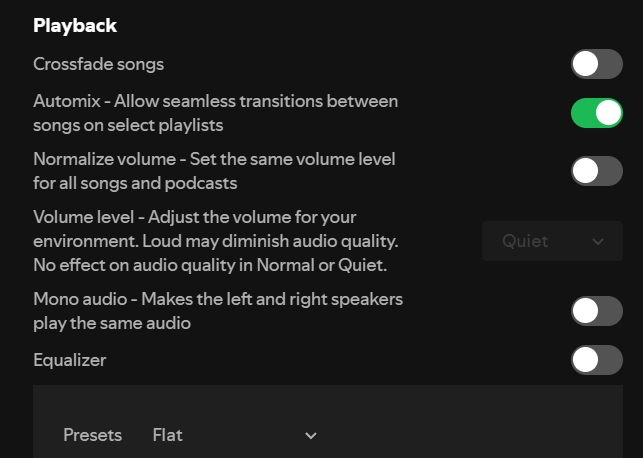
Of course, I set the Spotify quality to “Lossless”:
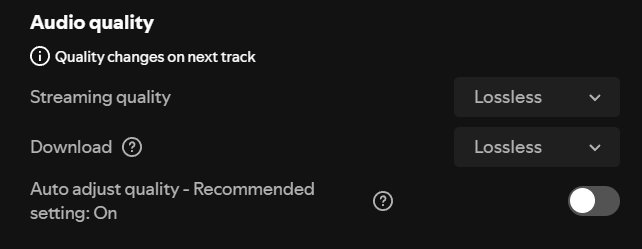
This should ensure that Spotify leaves the sound untouched on the client side. The problem is that Spotify sends the audio to the Windows audio stack, which does a lot of processing work, such as mixing the audio from Spotify with audio from other apps, upsampling, volume control, etc. This means that if you record the output, it will typically not match the input audio stream, whether you are listening to Spotify or playing a CD. (Some audiophile music players can operate in exclusive mode, which bypasses all this processing and talks more or less directly to your sound card, but Spotify does not support this.)
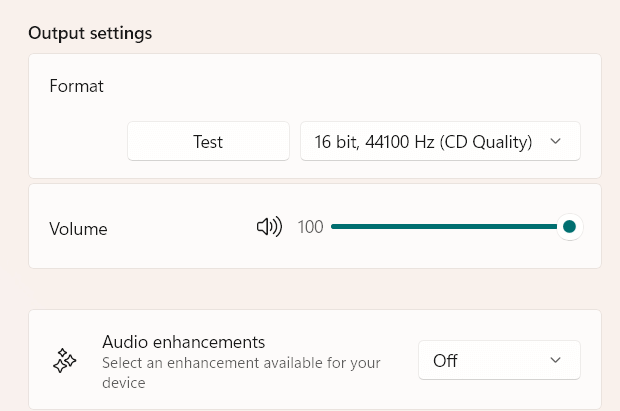
In order to minimize processing on the OS side, I set the output format of my sound device to 16 bits, 44,100 Hz. This is the format that is recorded on music CDs. If your output sample rate is different from 44,100 Hz (for example 48,000 Hz), Windows will resample your audio as soon as it comes out of Spotify and you will not be able to recover the original bits for this experiment.
Second, I turned off “audio enhancements”. On Windows 11, this setting can be found under System › Sound › Properties. Enhancements are custom filters that modify all the sound playing on your computer. For instance, some laptops have preinstalled filters that modify the sound to digitally jazz up their crappy speakers.
Finally, because I use EqualizerAPO, an excellent equalizer and DSP, I disabled all the filters in it. If you don’t use EqualizerAPO, you don’t have to worry about this. (BTW, I did measurements with EqualizerAPO uninstalled and the results were identical. With all filters disabled, it appears to be totally transparent.)
After making these changes, I rebooted just to be on the safe side.
CAudioLimiter
When I first attempted this experiment, I found significant deviations from the reference whenever the track got very close to maximum amplitude.
Windows has a built-in limiter (CAudioLimiter) which activates whenever an audio stream gets too close to the maximum sound level (the threshold is about −0.13 dB). To my knowledge, it cannot be disabled. Because most music (especially modern music) is mastered to reach the maximum sound level (0 dB), this means that – for most music – you cannot get strictly bit-perfect playback on Windows.
My workaround was to find an old, quiet track which doesn’t get close to 0 dB – “Come Fly with Me” from the Sinatra at the Sands live album.
Recording procedure
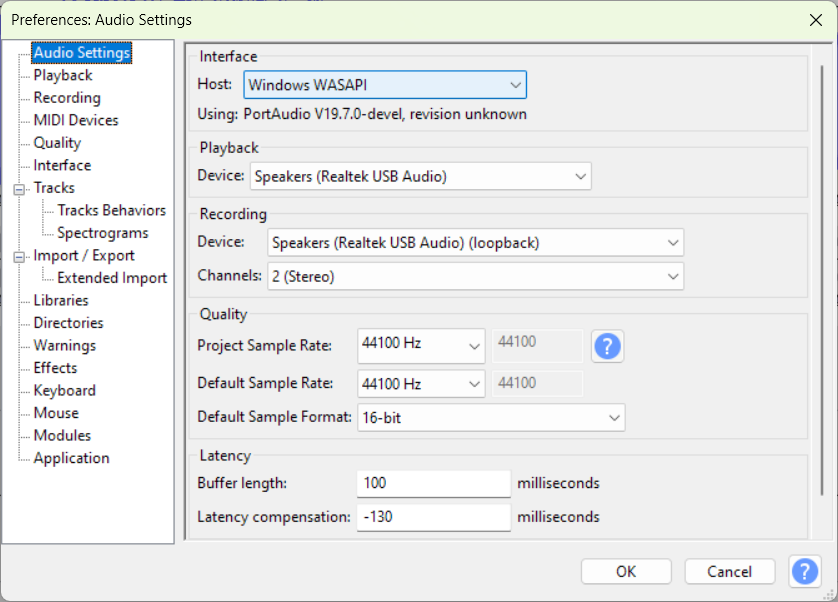
I used Audacity in WASAPI mode. I set the project quality to 16 bit, 44100 Hz to eliminate any resampling or rounding errors. The recording device was set to “Speakers (Realtek USB Audio) (loopback)”. WASAPI loopback mode allows Audacity to capture outgoing audio from within the Windows Audio Subsystem before it reaches the system volume control.
I played the Sinatra track in the Spotify Windows app (on Windows 11 23H2, updated to November 2025) and recorded it into a new Audacity project. I imported the reference FLAC (ripped from the CD) as another track. Then, I aligned both tracks so that they started on the exact same sample. This was a painstaking task that required a lot of zooming and scrolling, but it is very important, as any misalignment will look like there is a difference between the two tracks.
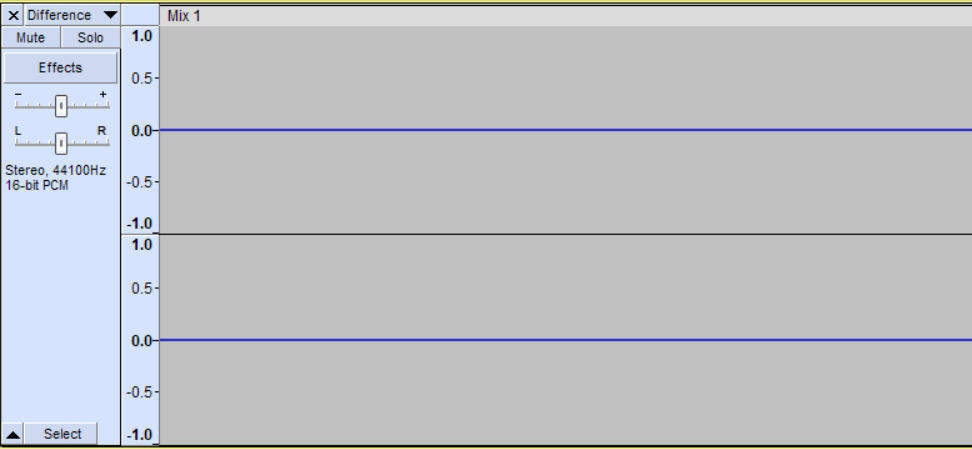
Once the tracks have been aligned and trimmed, I inverted the reference track and mixed it with the Spotify track. This produces the difference between the two tracks. If they are identical, the difference will be complete silence (a sequence of zeroes).
Results
Here is the result visually. Looks like silence.
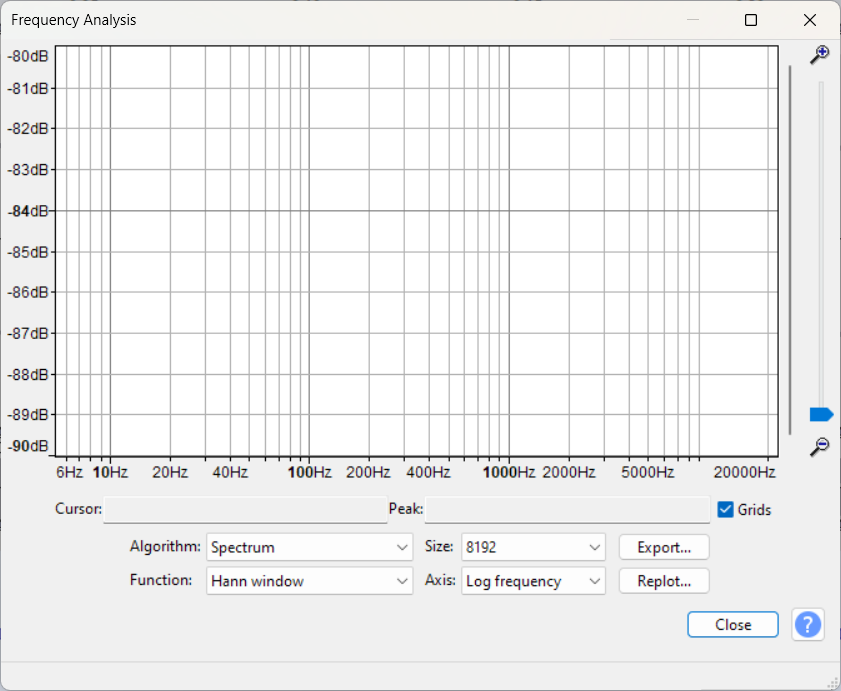
Here is the frequency spectrum of the difference. If the tracks are identical, we should get silence and that’s what I got:
 :
:
Here is a close-up of the difference. At this extreme zoom level, we can see individual samples. Most of them are 0, and maybe 20% are very small values, less than 0.0001 of the maximum sound level (i.e. less than −80 dB).
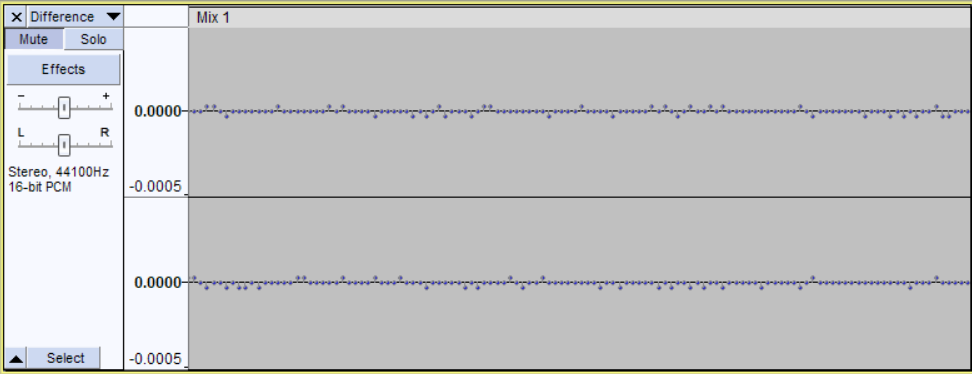
Then, I exported the numeric sample values to a text file. Audacity has an export limit of 1,000,000 samples, which translates to 22 seconds of CD audio. After importing the values to Excel, I verified that 77% of the samples were 0, and the remaining 23% were off by ±1. That means the maximum deviation from the reference was 1, which is about −90 dB. When I amplified the difference and played it back, it sounded like white noise.
Importantly, when I played back the original FLAC with Foobar2000 and repeated the above procedure, I got the same results (except the off-by-one samples were in different places). I’m not going to post the waveforms because they look essentially the same as those for Spotify.
How should you think about a 1 bit difference? Any deviation from bit-perfection is bad, right? Well, it is equivalent to adding extremely quiet noise to the original track. If the maximum sound level when playing back the track were as loud as truck traffic at 10 meters (~90 dB SPL), then this noise would be as loud as the quietest possible sound that a human can hear in perfect silence (0 dB SPL). So you would have to turn up your amp quite a lot for this noise to be even theoretically audible, except you wouldn’t hear it because it would get drowned out by the music (our ears cannot perceive very loud and very quiet sounds at once).
Conclusion: Spotify Lossless is really lossless
Because the audio stream captured from Spotify Lossless was an almost exact match to the original recording and was indistinguishable from Foobar2000 playing back the original recording, the most likely conclusion is that Spotify Lossless itself plays back the exact audio stream recorded on the original master, but further stages of the audio chain add some distortion. In this test, this distortion was a microscopic amount of noise, but remember that I picked an unusually quiet track. The majority of music will also trigger CAudioLimiter, which produces much louder distortion (up to −60 dB) as it attenuates louder parts of songs. (You can defeat it by very slightly turning down the volume in Spotify [not in Windows!] or in a systemwide filter like EqualizerAPO – 97% or −0.2 dB should be enough. More info in this Audio Science Review thread.)
Postscript: Enable 24-bit output to eliminate “off by one” errors
After publishing this post, I did another experiment to see what happens when Windows audio output is set to 24 bits, 44100 Hz (rather than 16 bits). I have good news: the ±1 bit deviations disappeared and the output recorded in Audacity was a 100% match to the reference CD! This proves beyond a shadow of a doubt that Spotify Lossless is capable of lossless, bit-perfect playback. (As mentioned above, though, most tracks will be louder than the test track and so will be subject to CAudioLimiter distortion.) You can read the detailed report here.
To the best of my knowledge the Win mixer is always active.
It converts to float, mix, dither and convert back to integer.
As you have set the Win audio to 16 bit, by design the LSB will be bit 16 and it will be dithered. Hence you get tiny differences.
Better set Win to 24 for playback as this will leave bit 16 unaltered.
I just ran some tests. Apparently, if you set Windows to 24 bits, it leaves all the bits unaltered – 100% bit perfect playback from Spotify Lossless on the test track!
It’s pretty cool that Spotify lossless is actually lossless. I was wondering that myself when it came out. Thank you for doing all the work to verify this!