
Two weeks ago, I published the results of an experiment where I examined the output of Spotify in Lossless mode on a Windows system. The conclusion was that Spotify Lossless does indeed provide the same audio stream as on the original CD – at least for some music.
One wrinkle in the report was that about 20% of the measured samples were off by exactly 1 (positive or negative). This micro- (or rather nano-) distortion was not the fault of Spotify – rather, it was added by the Windows audio chain, as demonstrated by the fact that playing back the original track with Foobar2000 resulted in the same off-by-one errors, just arranged differently across the stream.
Out of curiosity, I decided to repeat the experiment with Windows audio format set to 24 bits. Would the ±1 errors simply move to the lowest bit in a 24-bit sample – rendering them totally obscured by the noise of your DAC (regardless of how high-end it is)?
Let’s dig in.
Experimental setup
The experiment was set up exactly the same as the previous one, with two differences:
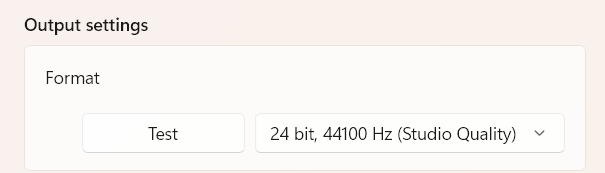
- The Windows audio output format was set to 24 bit, 44100 Hz (Studio Quality) rather than 16 bit, 44100 Hz (CD Quality).
- The default sample format in Audacity was set to 24-bit.
Results
As before, I used Audacity to generate the difference between the output of the Spotify app and the reference audio stream. Here is what the waveform looks like at the maximum zoom level:
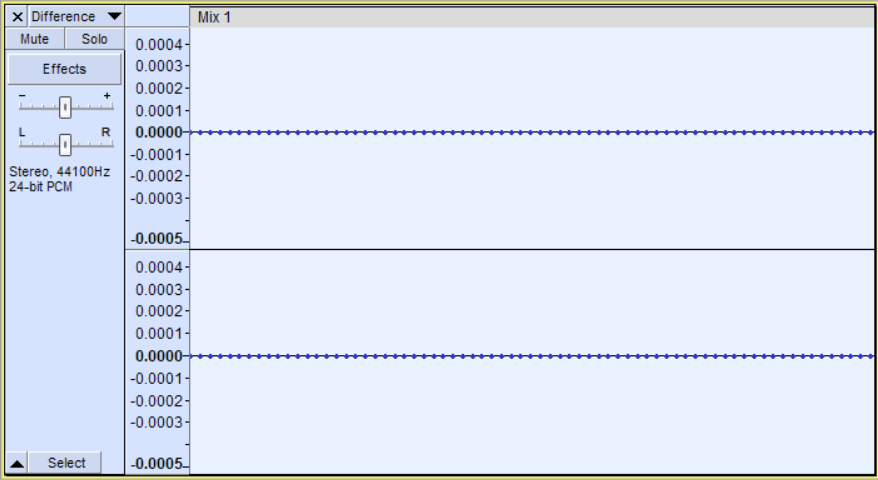
Total silence, at least as far as the highest 16 bits are concerned. Of course, I wanted to have a gander at the actual sample values – and here I stumbled upon a limitation of Audacity. When you export sample values, Audacity rounds them to 5 decimal places, but you need 7 decimal places to examine the lowest bits in a 24-bit sample. Fortunately, you can actually go into your Audacity program folder and edit the script for the Sample Data Export feature to get more decimal digits. The script is named sample-data-export.ny and resides in the Plug-Ins subfolder. For good measure, I also increased the limit on the number of exported samples from the default of 1,000,000.
Unfortunately, once you exceed one million values, it becomes impossible to analyze the data in Excel, as that fine tool is limited to (roughly) a million rows. So I used GitHub Copilot to vibe-code a Python script that reads in the sample values and reports various useful statistics. I then expanded it to accept not just TXT exports, but also regular WAV files (including floating-point WAVs) – which actually made the whole song and dance with modifying Sample Data Export unnecessary, but hey, at least I learned something, right?
Here’s what the Python script coughed up after I fed it a WAV file (exported from Audacity) containing the difference between Spotify Lossless and the reference track from CD:
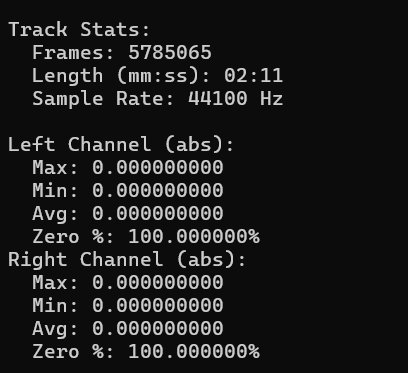
As you can see, the difference is simply a string of zeroes, down to the crummiest, least significant bit in each of the five million 24-bit samples.
If you are worried that I relied on AI-generated code, rest assured that I examined and tested the code and – as a sanity check – I confirmed the analysis using DeltaWave. I say that’s good enough for unpaid Internet labor.
Conclusion
There you have it, folks – 100% bit-perfect playback out of Spotify on a Windows system! Pristine losslessness that will satisfy even the most paranoid audiophile!
Don’t get too excited, though – I should reiterate that my reference track was specially chosen for not being mastered to 0 dBFS to avoid triggering a built-in Windows filter called CAudioLimiter that ducks the volume whenever it exceeds −0.12 dBFS (or thereabouts). Most contemporary music tracks are mastered to reach 0 dBFS, so you will get distortion whenever they get too loud. For more about CAudioLimiter and how to get around it, peruse my original post.
As to why Windows randomly adds or subtracts ones from your audio if your output format is 16 bits, but not if your output format is 24 bits, I think a plausible explanation is that it uses some kind of dithering algorithm in 16-bit mode, which behaves a bit suboptimally (I mean, it shouldn’t add noise when playing a 16-bit track on a 16-bit audio device). Perhaps in 24-bit mode, Windows doesn’t bother dithering at all – which would be sensible, as at that level of precision, you don’t really need to worry about quantization noise.
No Comments so far
There are no comments yet...Kick things off by filling out the form below.